
TL;DR

Get the little things that make your day delivered free with Prime
- Fast, free delivery on millions of items
- Prime Video, Amazon Music and more included
- Member-only deals all year
Building your own AI workstation isn’t automatically cheaper anymore. Prebuilt systems often match or beat DIY costs due to component shortages and bulk buying, while offering faster deployment and better support. Your decision depends on whether you value control or convenience most.
Imagine this: you need a powerful AI workstation, ready to run models like GPT or Stable Diffusion. You’re faced with a choice—build it yourself or buy prebuilt. The old rule was simple: building saves money, buying saves time. But in 2026, that’s no longer the case.
The AI boom, supply chain snarls, and bulk buying have flipped the script. Now, the real question is whether you want to control every detail or get a system that’s ready to go. Let’s break down the pros and cons of each, so you can pick the right path for your needs.
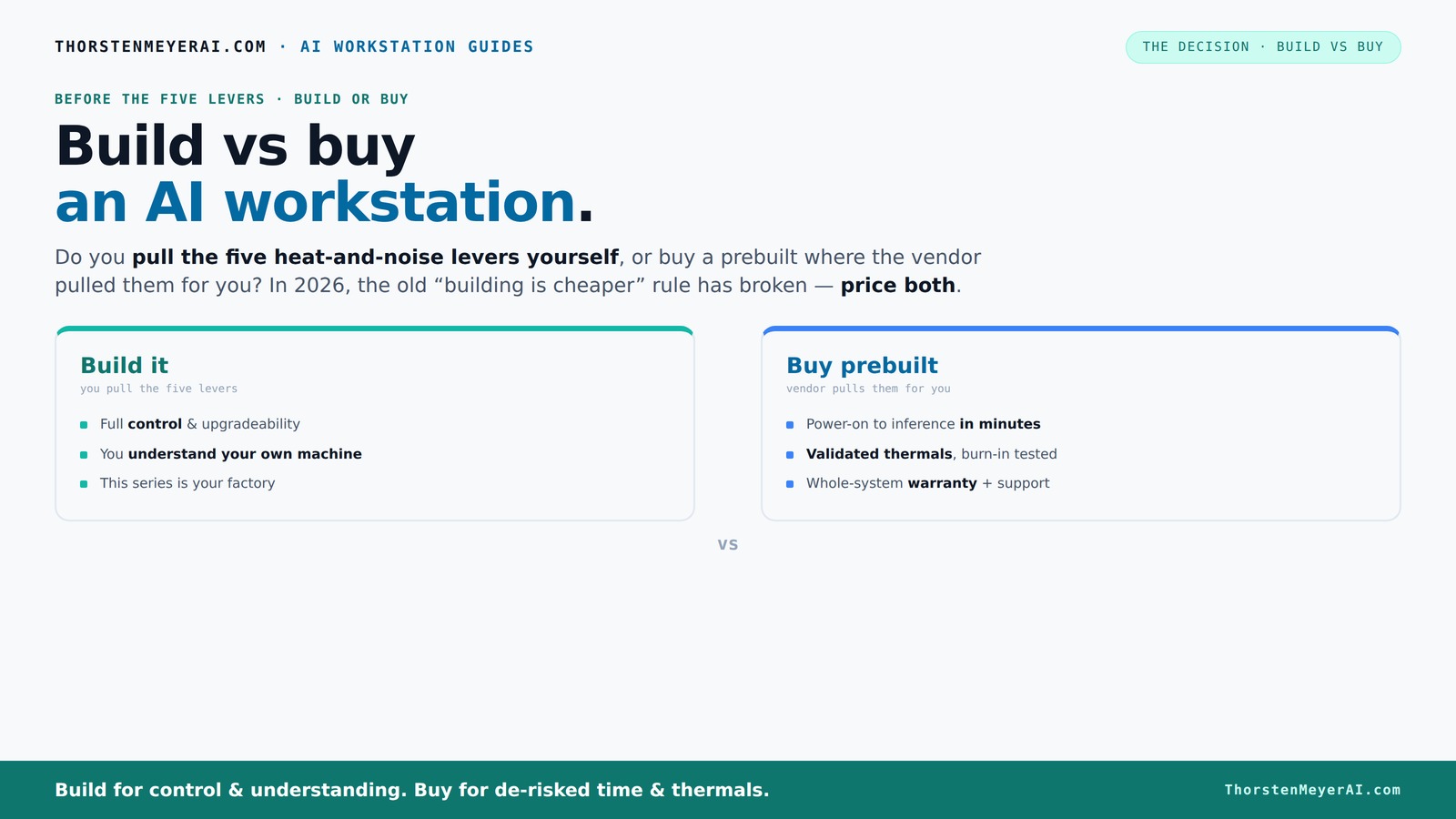
Build vs buy
an AI workstation.
The real question behind this whole series: do you pull the five heat-and-noise levers yourself, or buy a prebuilt where the vendor pulled them for you? And in 2026, the old “building is cheaper” rule has broken. Match your situation in Part 3.
Key Takeaways
- Component shortages and bulk buying have made prebuilt AI workstations often cost-competitive or cheaper than DIY builds in 2026.
- Prebuilts offer validated thermals, faster deployment, and warranties that lower operational risk, especially for multi-GPU setups.
- Building your own system provides maximum control, customization, and upgrade flexibility—ideal for hobbyists and specialists.
- Hybrid approaches—buy the base and upgrade selectively—are increasingly popular, balancing speed and control.
- Deciding depends on your workload, technical skill, time constraints, and whether you value operational simplicity or customization.
high performance AI workstation prebuilt
As an affiliate, we earn on qualifying purchases.
As an affiliate, we earn on qualifying purchases.
Why Building Your AI Workstation Isn’t Always Cheaper Anymore
If you thought building was always the budget-friendly choice, think again. Recent years have pushed component prices sky-high—think DDR5 RAM jumping over 50%, GPUs like the RTX 4090 costing around $1,600, and SSDs climbing due to shortages. If you're considering your options, you might want to explore Build vs Buy a Prebuilt AI Workstation to understand the latest trends. What used to cost under $1,000 in parts now easily surpasses $1,250, even before OS and support.
More importantly, these costs are not just numbers—they influence your decision-making. For more insights, see our guide on Build vs Buy a Prebuilt AI Workstation. For instance, if you're a startup or a researcher with a tight budget, the rising prices mean you might spend more time sourcing parts or risking compatibility issues. Conversely, prebuilt vendors like Lambda or Puget Systems bought components in bulk before prices spiked, allowing them to offer systems at prices that are often comparable or even lower than what you'd pay piecemeal. This bulk buying also ensures quality control and reliability, which can be critical if your AI workloads are mission-critical.
This shift signifies a fundamental change: the old rule of cheap DIY builds no longer applies broadly. To learn more about how to navigate this landscape, visit Build vs Buy a Prebuilt AI Workstation. You must now weigh not only the sticker price but also the time, effort, and risk involved. For example, a researcher needing a system quickly might find that a prebuilt saves them days or weeks of sourcing, assembling, and troubleshooting. Similarly, a small startup might find that the operational costs—support, warranties, and troubleshooting—favor prebuilt solutions. Understanding these tradeoffs is key to making an informed choice.
customizable GPU workstation build
As an affiliate, we earn on qualifying purchases.
As an affiliate, we earn on qualifying purchases.
The Five Levers of a High-Power AI Workstation and Who Controls Them
Making an AI workstation run cool and quiet isn’t just about picking the right parts—it’s about managing thermal performance carefully, especially under heavy workloads. For detailed tips, check out Build vs Buy a Prebuilt AI Workstation. The five key levers—undervolting the GPU, matching the cooler to the CPU, optimizing airflow, tuning fan curves, and positioning the machine—are critical because they directly impact system stability, noise levels, and longevity. For example, a GPU that runs hot can throttle performance or degrade faster, while poor airflow can cause hotspots that shorten component lifespan.
Buy a prebuilt → the vendor handles these levers. They often use custom water cooling or advanced airflow designs, and extensively test thermal performance before shipping. For instance, systems from Lambda or BIZON include custom water cooling loops that keep GPUs under 65°C even under full load, significantly reducing noise and thermal stress. This means you get a machine that’s not only high-performing but also quiet and reliable, with minimal effort on your part.
Build it yourself → you choose your cooling solutions and fine-tune fan curves. For example, you might install a custom water cooling loop or high-quality air coolers, then manually adjust fan speeds to balance noise and temperature. This approach gives you control over thermal performance but requires knowledge and time to optimize. For instance, a hobbyist might experiment with different radiator sizes, pump speeds, and fan profiles, learning valuable skills but risking mistakes that could lead to overheating or hardware failure.
This decision is less about parts and more about who manages the thermal levers—yourself or your vendor. The implications are significant: good thermal control extends hardware lifespan and maintains performance, but mastery requires effort, while vendor-managed solutions trade customization for convenience and reliability.
professional AI workstation with RTX 4090
As an affiliate, we earn on qualifying purchases.
As an affiliate, we earn on qualifying purchases.
When Buying a Prebuilt Can Save You Time, Money, and Headaches
If you value getting started quickly, a prebuilt system often beats a DIY build. To see some options, visit Doomsday Robots for more on ready-to-use AI systems. Imagine needing a machine for a critical project deadline—you don’t want to spend weeks sourcing components, worrying about compatibility, or troubleshooting assembly issues. Prebuilt systems arrive with the OS, drivers, and AI frameworks like CUDA and TensorFlow preinstalled, allowing you to start training models immediately. This ready-to-run setup can save days or even weeks, especially when time is of the essence.
Plus, reputable vendors perform rigorous stress testing—running the system under load for 24–48 hours—to ensure stability and thermal performance. For example, a professional AI startup might choose a prebuilt from Lambda, knowing it’s validated for multi-GPU configurations, with power delivery and cooling optimized for demanding workloads. This reduces operational risk, minimizes downtime, and often includes support and warranty that cover hardware issues, which can be a lifesaver during critical projects.
In scenarios like multi-GPU setups, prebuilt vendors have already validated power supplies, cabling, and cooling solutions, which can be complex to engineer yourself. For example, a researcher needing four GPUs for deep learning training might find that DIY solutions require extensive testing and custom modifications—costly and time-consuming. Prebuilts simplify this process, allowing users to focus on their work rather than troubleshooting hardware issues.
As an affiliate, we earn on qualifying purchases.
When Building Yourself Makes Sense: Control, Customization, and Learning
If you’re technically inclined, building your own AI workstation offers unmatched control and customization. Learn more about the process at Build vs Buy a Prebuilt AI Workstation. Imagine choosing a GPU tailored specifically for your workload—say, a quiet RTX 4080 for development or an A100 for large-scale training—and pairing it with a custom water cooling loop designed for silent operation. You can select specific RAM modules, motherboards, and storage solutions that meet your exact needs, optimizing for performance, noise, or power efficiency.
Building your own system also provides a valuable learning experience. For example, a hobbyist assembling their first workstation might learn about thermal dynamics by experimenting with different cooling configurations, or understand power delivery by selecting and installing a custom PSU. This knowledge can be empowering, especially for professionals or students who want to deepen their understanding of hardware and system design.
However, this approach requires significant effort upfront. Troubleshooting hardware compatibility issues, ensuring proper cooling, and stress-testing the system can take days or weeks. But the payoff is a machine precisely tailored to your workload, with the ability to upgrade or modify components over time without proprietary constraints. For instance, a researcher might upgrade the GPU or add more RAM after initial setup, extending the system’s lifespan and performance potential.
Cost Comparison Table: Build vs Buy in 2026
| Feature | Build Your Own | Prebuilt System |
|---|---|---|
| Initial Cost | Often higher due to component shortages; around $1,250+ for a capable setup | Competitive or lower, thanks to bulk buying and optimized configurations |
| Deployment Speed | Weeks to months, sourcing and assembling parts | Days to a few weeks, ready to run out of the box |
| Control & Customization | Complete control over parts, cooling, and setup | Limited to vendor options, but optimized for reliability |
| Support & Warranty | Own troubleshooting; warranty varies by parts | Single support channel, often with multi-year warranty |
| Upgradeability | Highly flexible; easily swap parts later | Depends on vendor design; may be limited or proprietary |
Who Should Buy Prebuilt, Who Should Build Their Own
Buy a prebuilt if you’re short on time, prefer plug-and-play convenience, or want a system backed by support and warranty. This is ideal for professionals, startups, or teams needing fast deployment.
Build if you love hardware, want maximum control, or have a specific, non-standard workload. Hobbyists, students, or those with deep technical skills often prefer DIY for the learning and customization benefits.
Many find a hybrid approach best—buy the base system, then upgrade memory or GPU later. This lets you start fast, then tailor as needs evolve.
Recent Trends: Hybrid Approaches and Faster Deployment
Modern AI workflows often combine both worlds. Buying a solid base system and then customizing it with additional RAM, better cooling, or extra GPUs is increasingly common. This hybrid approach offers speed and control, with a little DIY skill.
In 2026, the focus is on speed-to-value. Organizations prefer systems that get them up and running in weeks, not months. For example, a research lab might purchase a prebuilt system and then add more RAM or GPUs later as their project scales, rather than waiting for a fully custom build. This flexibility allows teams to adapt quickly to changing project needs without sacrificing the benefits of a reliable baseline system.
This trend reflects a shift from the old ‘build cheap, upgrade later’ mindset to a more pragmatic, flexible model that balances initial investment with future scalability.
Frequently Asked Questions
Is it cheaper to build or buy a prebuilt AI workstation?
In 2026, component shortages and bulk purchasing have leveled the playing field, often making prebuilt systems just as affordable or cheaper than DIY builds, especially when factoring in time and troubleshooting costs.What GPU should I choose for my AI workload?
For most local AI tasks, an NVIDIA RTX 4090 or A100 is ideal, depending on your budget and workload. Check out [quiet GPUs for local AI](https://thorstenmeyerai.com/quiet-gpus-local-ai/) for detailed recommendations.Can a prebuilt workstation be upgraded later?
Yes, but it depends on the vendor design. Many systems support adding RAM or NVMe drives, but proprietary cases or power supplies can limit GPU upgrades. Consider this when choosing a system if future expandability matters.How do I compare total cost of ownership, not just upfront price?
Include support, warranty, operational costs, electricity, cooling, and potential downtime. A prebuilt with validated thermals and support might cost more upfront but save money over time.When does it make sense to buy now and build later?
If you need immediate results or lack time, buy a robust prebuilt now. You can always upgrade or customize later as your workload grows or your skills develop.Conclusion
In 2026, the choice between building and buying your AI workstation isn’t just about cost—it's about control, speed, and support. For most, a prebuilt offers a ready-made, reliable platform that gets you into action fast. But if you love tuning hardware or need something highly specific, building remains a rewarding option.
Remember, the best decision aligns with your workload and how much time you want to spend on setup versus running models. As AI hardware continues to evolve, so will your options—choose wisely, and keep your focus on what truly matters: your work.
Halloween Picks
halloween
As an affiliate, we earn on qualifying purchases.