
TL;DR

Get the little things that make your day delivered free with Prime
- Fast, free delivery on millions of items
- Prime Video, Amazon Music and more included
- Member-only deals all year
Moving your rig out of sight is the most effective way to cut noise. Proper placement, ventilation, and acoustic treatment turn a noisy setup into a silent, cool operation—proven by real-world success stories.
Ever notice how your high-power AI workstation sounds like a jet engine? That noise can be distracting, annoying, and even stressful. But what if the best way to quiet your rig isn’t more foam or better fans? What if, instead, you could just put it in another room — or even a closet — and forget about it?
This article reveals how smart placement and proper acoustic dampening can make your noisy machine vanish. Plus, you’ll learn the secret of the ‘rig in the closet’ setup — how to keep your hardware cool while staying silent. If you’re tired of noise ruining your focus or disturbing your family, read on. You’ll get practical, real-world tips that actually work.
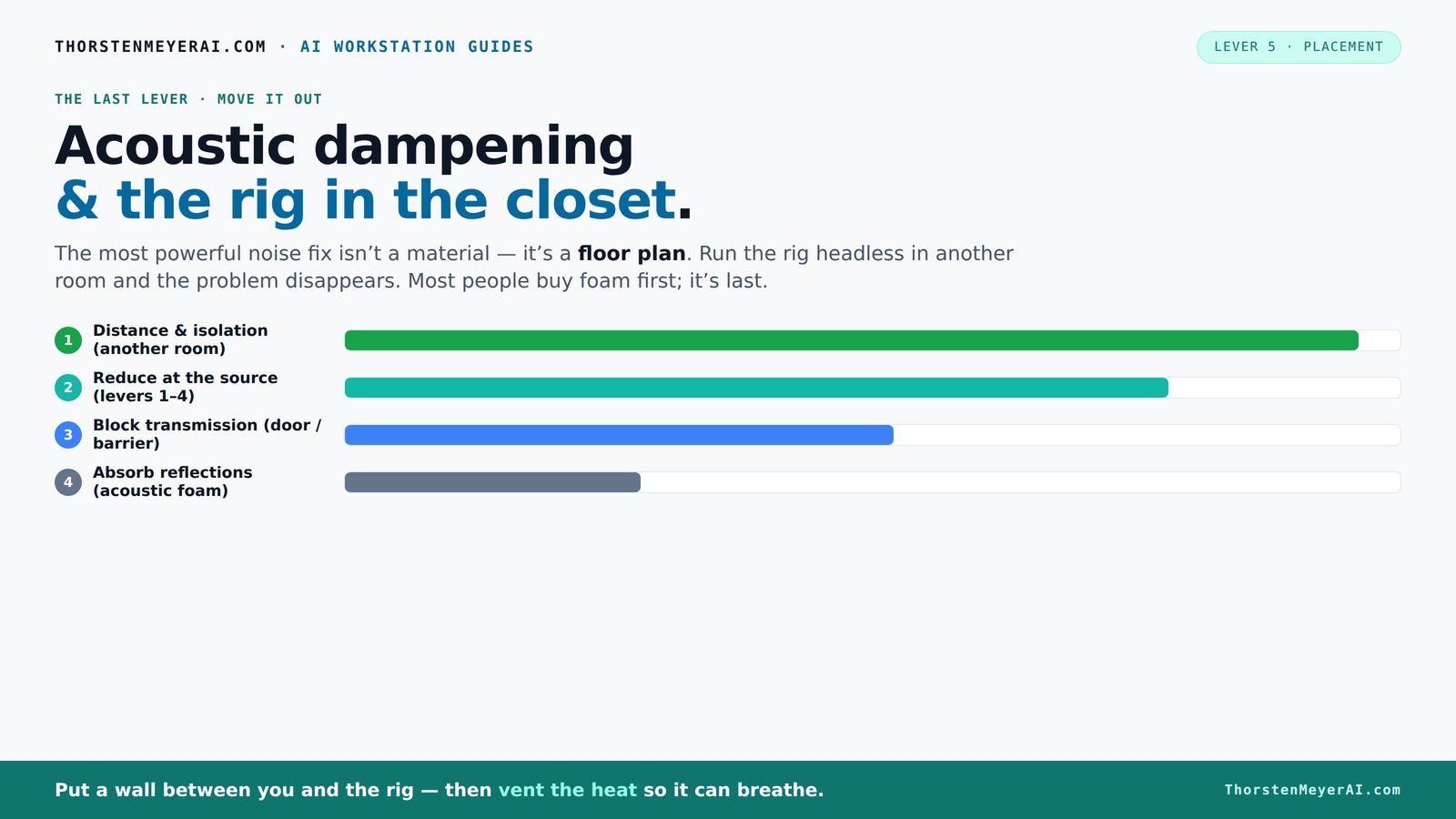
Acoustic dampening
& the rig in the closet.
The most powerful noise fix isn’t a material — it’s a floor plan. A rig you can’t hear because it’s in another room beats any amount of foam. Tap the approaches in Part 1 to see what actually works.
(another room)
(levers 1–4)
(door / barrier)
(acoustic foam)
Contain the noise, not the heat
Key Takeaways
- Distance and physical separation from your rig are the most effective ways to cut noise — a simple move that pays off big.
- A 'rig in the closet' can be quiet and cool if you add proper ventilation and decoupling; sealing it without airflow leads to overheating.
- Acoustic dampening materials like foam absorb reflections but don’t block sound; combine with dense barriers for best noise control.
- Vibration isolation is often overlooked but critical — rubber feet and anti-vibration mounts can significantly reduce low-frequency hum.
- Monitoring temperature and airflow is essential when placing a high-power rig in an enclosed space—safety first!
soundproof room divider for PC setup
As an affiliate, we earn on qualifying purchases.
As an affiliate, we earn on qualifying purchases.
Why Moving Your Rig Beats Soundproofing Every Time
Distance is the number one weapon against noise. When your rig lives in another room or a closet, the sound simply doesn’t reach you. It’s like putting a mountain between you and the noise source. You can crank the fans or GPU load all you want, and it won’t bother anyone in your workspace.
For example, a friend of mine moved his AI server to a basement corner. The noise dropped by over 80%, and he could finally work without distraction. All it took was a good Ethernet cable and a bit of ventilation.
According to research, sound levels drop by approximately 6 dB each time you double the distance from the source. That’s a noticeable difference — and it’s free.
Understanding why this works is crucial. Sound intensity diminishes with distance because energy disperses over a larger area, and the inverse-square law applies. The tradeoff is that, as you increase distance, you need to ensure proper connectivity and airflow. Otherwise, you risk creating a new problem—overheating or connectivity issues. So, while moving your rig is highly effective, it requires balancing physical separation with practical considerations like cabling and ventilation.
quiet computer case for noise reduction
As an affiliate, we earn on qualifying purchases.
As an affiliate, we earn on qualifying purchases.
How to Set Up a 'Rig in the Closet' Without Turning It Into a Hotbox
Placing your machine in a closet sounds perfect for silence — but without proper airflow, it’s a recipe for overheating. A sealed space traps heat, causing your rig to throttle or shut down. The trick is to breathe life into the closet with ventilation, but it’s not just about installing fans; it’s about understanding the balance between airflow and noise reduction.
Here’s how to do it effectively:
- Install passive vents or small intake/exhaust fans — even a quiet PC case fan works, but choose ones with low noise levels to avoid defeating your purpose.
- Use ducting or soundproof panels with built-in vents to ensure airflow while minimizing noise leakage. Properly sealed ducts can direct hot air outside without transmitting sound back into the room.
- Ensure the space is not fully sealed; allow hot air to escape and cool air to enter. This prevents heat buildup, which can cause thermal throttling and hardware damage.
- Monitor temperature with a smart sensor; keep it below 85°F for long-term safety. Overheating not only risks hardware failure but also can cause fans to ramp up, increasing noise.
- Consider an external radiator or liquid cooling system to move heat outside the closet, maintaining optimal temperatures without increasing noise levels significantly.
Balancing airflow with noise control is a tradeoff: more ventilation reduces heat buildup but can introduce noise. Using soundproofed ducting and strategic placement of intake and exhaust points can help you find that sweet spot where your rig stays cool and quiet, ensuring longevity and performance without sacrificing silence.
AmazonAs an affiliate, we earn on qualifying purchases.
The Role of Acoustic Dampening Materials in Your Closet Setup
Once your rig is in the closet, softening the sound inside becomes a priority. Acoustic foam, bass traps, and diffusers can tame echo and reduce the sound radiated outward. But remember: foam absorbs sound, it doesn’t block it.
Understanding why this matters is key. Absorptive materials like foam work by reducing internal reflections—think of them as softening the echo chamber inside your closet. This creates a more controlled acoustic environment, which can make the space more comfortable for recording or listening. However, these materials alone do little to prevent noise from leaking outside because sound can pass through gaps and thin barriers.
For example, lining the closet walls with high-density foam panels can significantly cut reverberations, making the space less echoey. But to truly block noise from escaping, you’ll need dense barriers like mass-loaded vinyl or soundproof blankets. Combining absorption (foam) with soundproofing (barriers) provides a layered approach—each addressing different aspects of noise control. This tradeoff ensures that internal reverberations are minimized while external noise leakage is kept in check, optimizing both sound quality and privacy.
Proper placement of these materials is critical. For example, bass traps placed in corners handle low-frequency rumble, which is often the hardest to contain and tends to leak out and bother neighbors or other rooms. Thoughtful application of both absorption and blocking materials ensures your setup is both acoustically friendly and neighbor-friendly.
AmazonAs an affiliate, we earn on qualifying purchases.
Vibration and Structure-Borne Noise: The Hidden Enemy
Not all noise travels through the air. Some sneaky sounds—like the low thrum of a GPU or hard drive—move through the physical structure of your desk, floor, or walls. This is called structure-borne noise, and it can be surprisingly disruptive even if the air is well soundproofed.
Understanding why this matters is key. Structure-borne noise can bypass traditional soundproofing efforts, transmitting vibrations directly through surfaces into neighboring spaces. This means that even if your closet is sealed and lined with foam, vibrations can still leak out via the desk, floor, or mounting points. The implications are that you need to address these vibrations directly, not just the airborne sound.
To combat this, you should decouple the machine from the surfaces it sits on. Using rubber feet, anti-vibration pads, or isolation mounts under your tower and on your desk can significantly reduce low-frequency hum and rattling. For example, placing rubber grommets between your rig and the desk can absorb vibrations, preventing them from traveling into the structure. A quick test? Place your hand on the desk when the rig is running—if you feel vibrations, adding decoupling measures will dramatically reduce the noise transmitted through the structure. Recognizing and mitigating these vibrations is essential for a truly quiet and neighbor-friendly setup.
Practical Tips for a Quiet, Well-Cooled 'Rig in the Closet'
Here are some actionable tips to keep your closet rig both cool and silent:
- Use a quiet, high-quality exhaust fan to vent hot air outside, ensuring continuous airflow without adding excessive noise.
- Install a small, ducted cooling system that moves heat out efficiently, such as a silent inline fan combined with ducting.
- Place the rig on rubber grommets or feet to cut vibration transfer, which reduces noise and structural vibrations.
- Monitor temperatures regularly with a reliable sensor, and adjust airflow or cooling solutions to keep temps below 85°F, preventing thermal throttling and hardware stress.
- Opt for liquid cooling solutions, which can move heat away faster and quieter than traditional air cooling, especially in confined spaces.
Pro tip: Combine a well-ventilated closet with a soundproof barrier—such as mass-loaded vinyl or acoustic blankets—for maximum noise reduction. For detailed strategies, check out this comprehensive cooling guide.
Frequently Asked Questions
How do I soundproof a closet for recording or work?
Start by sealing gaps around doors and vents, then add acoustic panels and bass traps inside. Cover the door with a soundproof blanket or mass-loaded vinyl for extra noise blocking. Proper sealing and absorption make a huge difference.
What materials are best for acoustic dampening in small spaces?
Mineral wool and high-density foam panels are highly effective at absorbing echoes. Bass traps in corners tame low-frequency rumble. Combining these materials inside a closet creates a much calmer acoustic environment.
How can I prevent my closet rig from overheating?
Ensure good ventilation with quiet fans or passive vents. Use ducting to move hot air outside, and consider liquid cooling solutions. Regularly monitor temperature sensors and never let your system run over 85°F for extended periods.
Can household items help with acoustic treatment?
Yes, thick blankets, curtains, and bookshelves can absorb some sound. But dedicated acoustic panels and barriers offer a much more controlled and effective solution. They’re worth the investment for serious setups.
What’s the best way to position equipment in a closet setup?
Keep microphones away from reflective surfaces, elevate the rig on anti-vibration pads, and place monitors at ear level outside the closet if possible. Proper cable management also reduces noise interference and clutter.
Conclusion
Moving your rig into a closet or another room isn’t just about hiding it away — it’s about reclaiming your workspace from noise. With smart placement, ventilation, and acoustic treatment, you create a quiet, cool haven for your work or hobby. It’s a simple shift that transforms your environment and your focus.
Imagine a workspace where your machine hums silently in the background, while you work or create without distraction. That’s the power of strategic placement and a little know-how. Ready to silence your rig?
NFL SEASON / TAI NFL season / tailgating Picks
team gearteam gear
As an affiliate, we earn on qualifying purchases.