

🔍 Read the full analysis: How To Select AI Automation Tools That Fit Your Workflow on ThorstenMeyerAI.com

Get the little things that make your day delivered free with Prime
- Fast, free delivery on millions of items
- Prime Video, Amazon Music and more included
- Member-only deals all year
TL;DR
A guide from ThorstenMeyerAI.com advises small businesses to choose one frequent, low-risk task, compare tools against its requirements, and test a limited automation. It recommends tracking quality and time over two weeks, with a person reviewing outputs and clear limits on data access and automated actions.
ThorstenMeyerAI.com has published a beginner’s guide for small-business owners and staff choosing an AI automation tool, recommending they begin with one repeatable, low-risk task rather than automate a whole department. The guide proposes a two-week pilot that measures quality as well as time saved, with a person reviewing outputs before they reach customers or affect important decisions.
The guide suggests tasks such as sorting incoming inquiries, drafting replies, or summarizing customer feedback. Before selecting software, users are told to write down how the task currently works, who handles it, how often it occurs, and roughly how long each case takes, as part of an SMB workflow checkup. A suitable pilot should have a recognizable trigger, clear inputs, and an output that staff can check.
It recommends choosing one main measure, such as minutes saved per inquiry or the share of messages categorized correctly, and recording a baseline during a normal week. Users should set a minimum acceptable quality level and a review date. The guide warns that a faster process may not be an improvement if it creates errors or extra correction work.
For software selection, the guide advises comparing two or three tools for their ability to support the exact trigger and action required, their testing and review features, and their cost, with AI workflow automation software options available to explore. It also points users to access controls, data retention, export options, usage limits, and plan-specific integration availability. The suggested setup time is two to four hours, followed by two weeks of evaluation.
A Smaller Pilot Limits Workflow Risk
For a small business, a narrow pilot offers a way to test whether automation fits an existing process before investing in broader deployment. A baseline and a defined review period can help owners distinguish a useful change from a tool that merely produces outputs quickly. Tracking accuracy, corrections, and staff time gives the business more than a speed estimate when deciding whether to continue.
The guide also treats permissions and human oversight as part of tool selection, not as afterthoughts. It advises keeping a person responsible for reviewing customer-facing messages and work involving payments, hiring, health, legal matters, or safety. That approach can limit the consequences of an incorrect output while staff learn how the system handles routine and unusual cases.
Products Worth Considering

Oura Ring 5 Smart Ring, Silver, Size 7
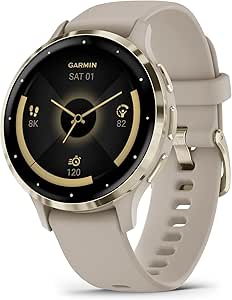
Garmin Venu 3S GPS Fitness Smartwatch, 41 mm, French Gray

Therabody WaveRoller Vibrating Foam Roller
As an affiliate, we earn on qualifying purchases.
From Task Baseline to Test Review
The source presents a practical procedure rather than reporting survey results, an industry-wide adoption figure, or a comparison of named products. Its central approach is to define the current process first, select a task with a clear start and finish, and then test only the software features needed for that task.
After choosing a tool, users are advised to map the workflow as a sequence: trigger, information used, AI task, output destination, and human review. The guide recommends directing results to a draft or review queue rather than publishing them automatically. It also calls for restricted account permissions and the exclusion or masking of information not needed for the task.
Testing should include at least 10 representative examples, including incomplete details, duplicate requests, unusual wording, and irrelevant messages. The guide says to compare outputs with what a knowledgeable staff member would produce and record missed information, errors, and necessary corrections. Early tests should use approved sample or redacted data where possible.
“Pick a frequent, low-risk task with clear inputs and outputs.”
— ThorstenMeyerAI.com guide
Results Depend on the Business Pilot
The source does not compare specific vendors, verify their current integrations or security practices, or report outcomes from businesses that completed the proposed pilot. Tool capabilities, account permissions, pricing, and available actions can vary by product and plan, so users are advised to confirm the exact integration before connecting an account.
The guide also provides no results showing how much time a typical business will save or what error rate to expect. Those findings remain specific to the workflow and test. The provided instructions end during the testing step, so they do not set out a detailed rule for how many errors should prompt changes or when a pilot should be stopped.
Review the Two-Week Test
The next step for a business following the guide is to finish testing representative examples, record errors and corrections, and run the limited workflow with a named person reviewing its outputs. Over the two-week evaluation period, staff can compare results with the baseline and check whether the minimum quality target is met.
At the review date, the business can decide whether to keep the automation, revise its instructions or boundaries, or stop the pilot. The guide calls for that decision to be based on observed performance; it does not announce a product launch, a broader deployment, or a quantified outcome.
Key Questions
What task should a small business automate first?
The guide recommends a frequent, low-risk task with a clear trigger and checkable result, such as categorizing inquiries or drafting replies for staff review.
How long should setup and evaluation take?
The guide estimates two to four hours for setup and recommends evaluating the pilot over two weeks. Actual timing may depend on the workflow and tool.
How should a business measure whether the pilot works?
Record a baseline and choose a primary measure, such as time saved or correct categorization. Track quality and correction work too, rather than judging the pilot by speed alone.
Should AI send customer messages automatically?
The guide recommends routing outputs to a draft or review queue and keeping a person responsible for customer-facing messages. It says to define limits on what the system can do without approval.
What should be checked before connecting a business account?
Check that the exact integration and action are available on the intended plan, and review permissions, data retention, export options, and usage limits. Connect only the accounts and access needed for the pilot.
Source: ThorstenMeyerAI.com