
🔍 Read the full analysis: How High Refresh Gaming Monitors Can Support Smoother Play on ThorstenMeyerAI.com

Get the little things that make your day delivered free with Prime
- Fast, free delivery on millions of items
- Prime Video, Amazon Music and more included
- Member-only deals all year
TL;DR
A product roundup from ThorstenMeyerAI.com compares eight high-refresh gaming monitors across resolution, refresh rate, panel type and screen format. The central tradeoff is that higher refresh can smooth motion, but a monitor’s benefits depend on the frame rate a PC can deliver and on whether its resolution and size suit the player.
ThorstenMeyerAI.com has compared eight high-refresh gaming monitors, weighing how resolution, panel type and screen format affect the pursuit of smoother play, as detailed in the original analysis. The roundup names the MSI MAG 272URDFA E16 its overall pick for combining 4K with a 320Hz refresh rate, while stressing that buyers need a PC capable of producing high frame rates at that resolution.
The guide’s recommendations reflect different priorities, not a single measure of speed, much like other high-refresh monitor comparisons. It presents the AOC Q27G41ZE as a QHD option with a 240Hz native refresh rate and a 260Hz overclocked mode, and the Samsung Odyssey OLED G6 as a premium alternative distinguished by its QD-OLED panel. The source does not provide prices or a full set of model specifications for all eight monitors.
For competitive players seeking high frame rates without the rendering demands of 4K, the roundup points to the ASUS VG259QM5A and Dell SE2426HG, both described as 24-inch-class 1080p models at 240Hz. The guide also includes the Sceptre 34-inch ultrawide, a 32-inch SANSUI display and the curved AOC C27G4ZH, outlining how larger formats can bring immersion while presenting pixel-density or game-compatibility tradeoffs, as with immersive OLED gaming monitors.
Its comparison method considers how refresh rate and resolution work together, alongside panel type, adaptive-sync support where specified, connectivity and adjustment details. The guide says it does not assume a feature is present when product details do not list it. The supplied material identifies these recommendations but does not name the eighth monitor, so that model cannot be independently described here.
The 8 picks
- 1
 Samsung 27" Odyssey OLED G6 (G61SH) QD-OLED Gaming MonitorView on Amazon →
- 2
 msi MAG 272URDFA E16 27-inch 3840 x 2160 (UHD) Gaming Office Monitor, 320Hz,…View on Amazon →
- 3
 Sceptre C345B-QU240T 34-inch Curved Ultrawide Gaming MonitorView on Amazon →
- 4
 SANSUI 32 Inch Curved 240Hz Gaming Monitor High Refresh Rate, FHD 1080PView on Amazon →
- 5
 AOC 27" Gaming Monitor QHD 240Hz Overclocked IPS NVIDIA G‑Sync Q27G41ZEView on Amazon →
- 6
 AOC C27G4ZH 27-Inch Curved FHD Gaming MonitorView on Amazon →
- 7
 ASUS TUF Gaming VG259QM5A 24.5-Inch 1080p 240Hz Gaming MonitorView on Amazon →
- 8
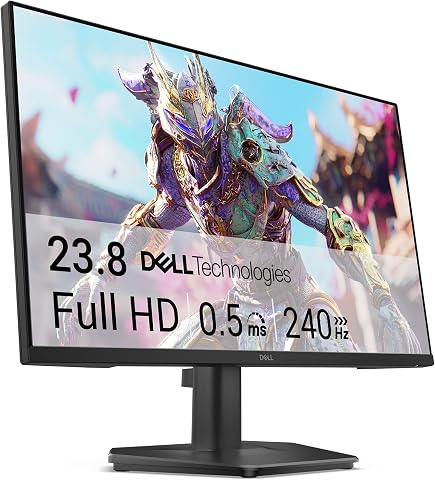 Dell 24 240Hz Gaming Monitor – SE2426HG – 23.8-inch FHD (1920×1080) 240Hz Dis…View on Amazon →
Matching Refresh Rates to Real Frame Rates
The roundup’s main practical point is that a high refresh specification does not guarantee a player will see a matching frame rate. A display can update frequently, but the PC and game still have to produce frames at a rate that can use that capacity. Resolution affects that workload: 4K requires more rendering power than 1080p, while QHD sits between them.
That distinction matters for buyers comparing headline numbers. A 320Hz 4K screen may suit a powerful system or games that can run at very high frame rates, but it may offer little practical advantage to someone whose PC cannot approach those rates. A 240Hz 1080p model can be a more realistic fit for a system aimed at competitive games. The guide also notes that adaptive sync, when supported, can help reduce tearing if frame rates vary.
Screen size and viewing distance also shape the choice. The same 1080p resolution spreads across more physical space on a 27- or 32-inch monitor than on a smaller display, which can make details look less crisp at a close desk distance. Choosing around a player’s games, hardware and setup may matter more than buying the largest refresh-rate figure.
Products Worth Considering

Fitbit Versa 4 Fitness Smartwatch with GPS and Heart Rate Monitoring, Black/Graphite

Oura Ring 5 Smart Ring – Silver, Size 9

Therabody Theragun Prime Plus Heated Deep Tissue Massage Gun, Black
As an affiliate, we earn on qualifying purchases.
Eight Models, Different Gaming Tradeoffs
The article frames the monitors as choices for different setups rather than as a universal ranking of performance. The MSI MAG 272URDFA E16 combines a high resolution with an unusually high stated refresh rate; the AOC Q27G41ZE offers a QHD alternative; and the Samsung model is set apart by its QD-OLED panel. These descriptions and rankings are the guide’s judgments, not the result of a benchmark dataset included in the supplied material.
The guide groups several other options around 1080p and 240Hz, a combination that can reduce GPU demands compared with rendering at 4K. Its large-screen picks introduce other considerations: ultrawide formats can provide more horizontal space, but support differs among games; curved displays change the viewing experience but do not, by themselves, raise performance. The source recommends checking game compatibility and desk distance before choosing either format.
What the Roundup Does Not Establish
The supplied source does not include a publication date, test results, prices, full specifications for every model, or an explanation of how each monitor performed in controlled comparisons. Its labels, including “best overall,” should be read as the roundup’s recommendations rather than as independently verified rankings. The source also does not identify the eighth model in the provided text.
It remains unclear how much practical difference a particular player would notice between 240Hz, 260Hz and 320Hz. That depends in part on the games played, system performance and the player’s own experience; the guide does not supply measured frame-rate or response-time comparisons. Product-specific adaptive-sync and connectivity details are also not fully provided in the material.
Check System and Game Compatibility
For buyers using the roundup, the next step is to compare their PC’s performance in the games they actually play with the monitor’s resolution and refresh rate. They can also confirm a model’s current price, exact feature support and connection options from its product listing or manufacturer before purchasing. Those details are not established in the supplied guide text.
Players considering an ultrawide or curved display should check whether their main games support the format and whether the screen suits their desk and viewing distance. The source describes no follow-up testing or forthcoming product announcement, so any further claims about performance, availability or ranking would require additional reporting.
Key Questions
Does a 320Hz monitor make every game run at 320 frames per second?
No. Refresh rate describes how often the display can update; it does not determine how many frames a PC produces. The computer and game must deliver sufficiently high frame rates to use the monitor’s full refresh capacity.
Why might 1080p be a better choice than 4K for competitive games?
The roundup says 1080p places less rendering demand on a graphics card than 4K, which can make higher frame rates easier to reach. Whether that tradeoff suits a player depends on their hardware, games and preference for image detail.
What does the guide say about the AOC Q27G41ZE?
It describes the AOC Q27G41ZE as a 27-inch QHD speed option with a 240Hz native refresh rate and a 260Hz overclocked mode. The supplied source does not provide independent test results for those modes.
Is an ultrawide monitor compatible with every game?
No. The guide says ultrawide support varies by game; some titles may show side borders or handle the interface differently. It recommends checking support for the games a buyer plays before choosing a 34-inch ultrawide.
Source: ThorstenMeyerAI.com