🔍 Read the full analysis: 6 Thunderbolt Docking Stations For A Desk Upgrade In 2027 on ThorstenMeyerAI.com

Get the little things that make your day delivered free with Prime
- Fast, free delivery on millions of items
- Prime Video, Amazon Music and more included
- Member-only deals all year
TL;DR
A source-based buying guide ranks six Thunderbolt docks, led by Anker’s Thunderbolt 5 model, and compares five Thunderbolt 4 options. The main advice is to check a laptop’s port, charging needs, operating system and monitor limits before choosing; the source does not provide current prices or independent test results.
ThorstenMeyerAI.com has published a six-dock buying guide for desk upgrades, ranking the Anker Prime 14-in-1 Thunderbolt 5 Dock first and comparing it with five Thunderbolt 4 models from Plugable and Dell. The guide’s central caution is that a dock’s advertised ports and charging figures do not guarantee that every laptop can use every feature: host compatibility and display limits matter.
The guide names Anker’s Prime 14-in-1 as its best overall pick for buyers seeking Thunderbolt 5 bandwidth and a broad selection of connections. It places the Plugable TBT-UDM among its preferred Thunderbolt 4 choices for cross-platform setups, and the Dell Pro SD25TB4 as a current Dell-oriented option. These are the source’s rankings and recommendations, not results from independent testing described in the supplied material.
The other three products are the Plugable 100W Thunderbolt 4 dock and Dell’s WD19TB and WD19TBS. The guide distinguishes the WD19TB by its listed 180W adapter and the Plugable model by its stated 100W charging and dual-monitor focus. It says the WD19 variants are related but not interchangeable buying choices; the supplied excerpt does not detail the WD19TBS configuration.
Its selection criteria include Thunderbolt generation, computer compatibility, charging, display support and port variety. The guide advises buyers to check the laptop’s exact connection specification, the operating system’s external-display limits, monitor resolution and refresh rate, and the power required by the computer. It also says to compare the devices that will be connected at the same time with the dock’s actual port types and layout.
The 6 picks
- 1
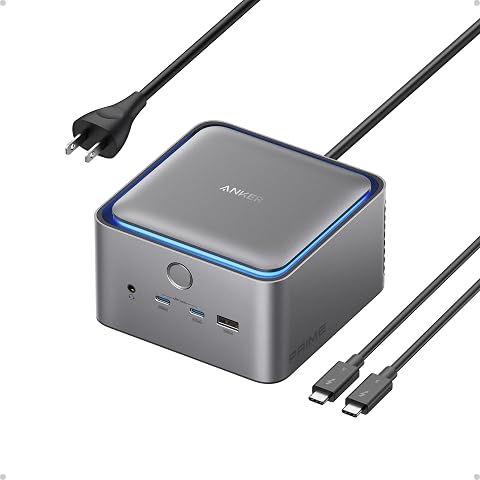 Anker Prime 14-in-1 Thunderbolt 5 Docking StationView on Amazon →
- 2
 Dell Pro Thunderbolt 4 Smart Dock SD25TB4 – USB-C Station 130W, 4 Displays 4K…View on Amazon →
- 3
 Plugable Thunderbolt 4 Dock with 100W Charging, Dual MonitorView on Amazon →
- 4
 Plugable Thunderbolt 4 Dock (TBT-UDM) for Mac and WindowsView on Amazon →
- 5
 Dell WD19TB Thunderbolt Docking Station with 180W AC AdapterView on Amazon →
- 6
 Dell Thunderbolt Dock WD19TBS with 130W Power DeliveryView on Amazon →
Compatibility Shapes the Desk Upgrade
The comparison matters because a docking station can consolidate displays, storage, networking and other desk peripherals through one connection, but its headline specifications do not describe the whole setup. The laptop, dock and monitors work as a system: the computer’s port and graphics capabilities can limit display output, while its power needs can affect whether dock charging is sufficient.
That makes the choice between Thunderbolt 5 and Thunderbolt 4 a practical one rather than a simple newest-is-best decision. A computer without Thunderbolt 5 may not benefit from that generation’s added headroom, while a Thunderbolt 4 dock may better fit an existing laptop and routine office peripherals. Checking requirements in advance can help buyers avoid paying for unused capability or finding that a planned display arrangement is unsupported.
Products Worth Considering

Oura Ring 4 Smart Ring, Silver, Size 8

Hyperice Normatec 3 Full-Leg Compression Boots, Standard Size

Withings ScanWatch Light Hybrid Smartwatch – White
As an affiliate, we earn on qualifying purchases.
Six Models, Two Thunderbolt Generations
The list contains one Thunderbolt 5 dock and five Thunderbolt 4 options. Anker’s Prime 14-in-1 is positioned for buyers who want newer-generation bandwidth and many connections. The Plugable TBT-UDM is presented as a cross-platform option; the second Plugable model emphasizes 100W charging and dual-monitor use. Dell’s Pro SD25TB4 is described as its newer Dell-oriented choice, while the WD19TB and WD19TBS may suit buyers matching an existing Dell setup.
The supplied source says the ranking weighs practical configuration details, including charging and display support, rather than treating similarly named products as identical. It does not include product prices, a publication date, detailed port-by-port specifications for all six models, or results from controlled performance tests. The guide’s rankings should be read as editorial recommendations based on the criteria it describes.
“The main tradeoffs are paying for Thunderbolt 5 headroom versus choosing a mature Thunderbolt 4 dock, and matching charging and display support to your particular computer.”
— ThorstenMeyerAI.com buying guide
Prices and Compatibility Still Need Checking
The supplied material does not state prices, stock status or a publication date, so it cannot establish which dock is the best value or whether each model will be available in 2027. It also does not provide complete technical specifications for every dock or a model-by-model compatibility table.
Exact monitor support remains dependent on the computer, operating system, display connections and configuration. The source does not confirm that any model will drive a particular number of screens at a given resolution or refresh rate on every host. Charging performance can also depend on the laptop’s power requirements and workload; listed adapter wattage should not be assumed to equal power delivered to the computer.
Verify Your Laptop Before Buying
Before choosing, buyers should check the laptop maker’s specifications for Thunderbolt support, supported external displays and recommended power supply. They should then compare those details with the dock’s current manufacturer specifications, including its delivered laptop charging power, operating-system compatibility and the precise monitor modes supported.
Because the source provides no pricing or availability information, shoppers will also need to confirm current listings and warranties with sellers or manufacturers. A final choice depends on the equipment already on the desk and which devices must operate simultaneously; the guide does not identify a single model as suitable for every setup.
Key Questions
Which dock does the guide rank first?
It ranks the Anker Prime 14-in-1 Thunderbolt 5 Dock as its best overall pick, citing its newer-generation bandwidth focus and broad connection set. That is the guide’s recommendation, not an independently verified performance result in the supplied material.
Which models are included in the six-dock comparison?
The list includes Anker’s Prime 14-in-1 Thunderbolt 5 Dock; Plugable’s TBT-UDM and 100W Thunderbolt 4 dock; Dell’s Pro SD25TB4; and Dell’s WD19TB and WD19TBS.
Will a Thunderbolt 5 dock work with a Thunderbolt 4 laptop?
The source advises checking the exact laptop and dock specifications rather than relying on the connector shape. It does not provide a compatibility ruling for every computer, and a Thunderbolt 4 host may not benefit from Thunderbolt 5 bandwidth.
Can these docks run two monitors on every computer?
No such universal claim is supported by the source. Monitor results depend on the laptop’s display limits, operating system, monitor resolution and refresh rate, and connection type. Verify the exact dual-display configuration for the computer before buying.
Is 100W charging enough for my laptop?
It depends on the computer’s recommended power supply and how it is used. The guide recommends comparing the laptop’s power needs with the dock’s delivered charging output; a demanding workstation may require more power or charge more slowly under load.
Source: ThorstenMeyerAI.com